Reading CSS
selectors, the cascade, layout
What it is
CSS answers two questions: what to apply it to (the selector) and what to do (the properties). The difficulty isn't in the properties — there are simply a lot of them and you look them up. The difficulty is in two other places: why a rule didn't apply, and why a box is in the wrong place.
Both are covered below, and both on real screenshots of what the browser drew.
What it looks like in code
.card {
  display: flex;
  gap: 8px;
  padding: 12px;
  border: 1px solid #d8dce5;
}

.card__title {
  font-size: 18px;
  font-weight: 600;
}

.card:hover { background: #f7f8fa; }
Selectors
| Selector | What it applies to |
|---|---|
.card | elements with the class card |
#main | the element with id="main" |
article | every <article> tag |
.card .title | .title inside .card |
.card > .title | .title as a direct child |
.card:hover | .card under the cursor |
[data-city="oslo"] | by attribute value |
A space between classes means "inside", and it is the most common source of
confusion: .card .title and .card.title are different things. The
second is an element that has both classes at once.
The cascade: who wins
When two rules fit an element, the "heavier" one wins. In increasing order of weight:
| What | Weight |
|---|---|
a tag: article | low |
a class: .card, :hover, [data-*] | medium |
an id: #main | high |
style="..." right in the tag | very high |
!important | beats everything |
At equal weight the one lower in the file wins.
Hence a practical consequence: !important in generated CSS is almost
always a sign the AI did not work out which rule was in the way and
overrode it by force. It will work; the next change will be harder.
Layout: display decides everything
The same markup of three boxes, three values of display:
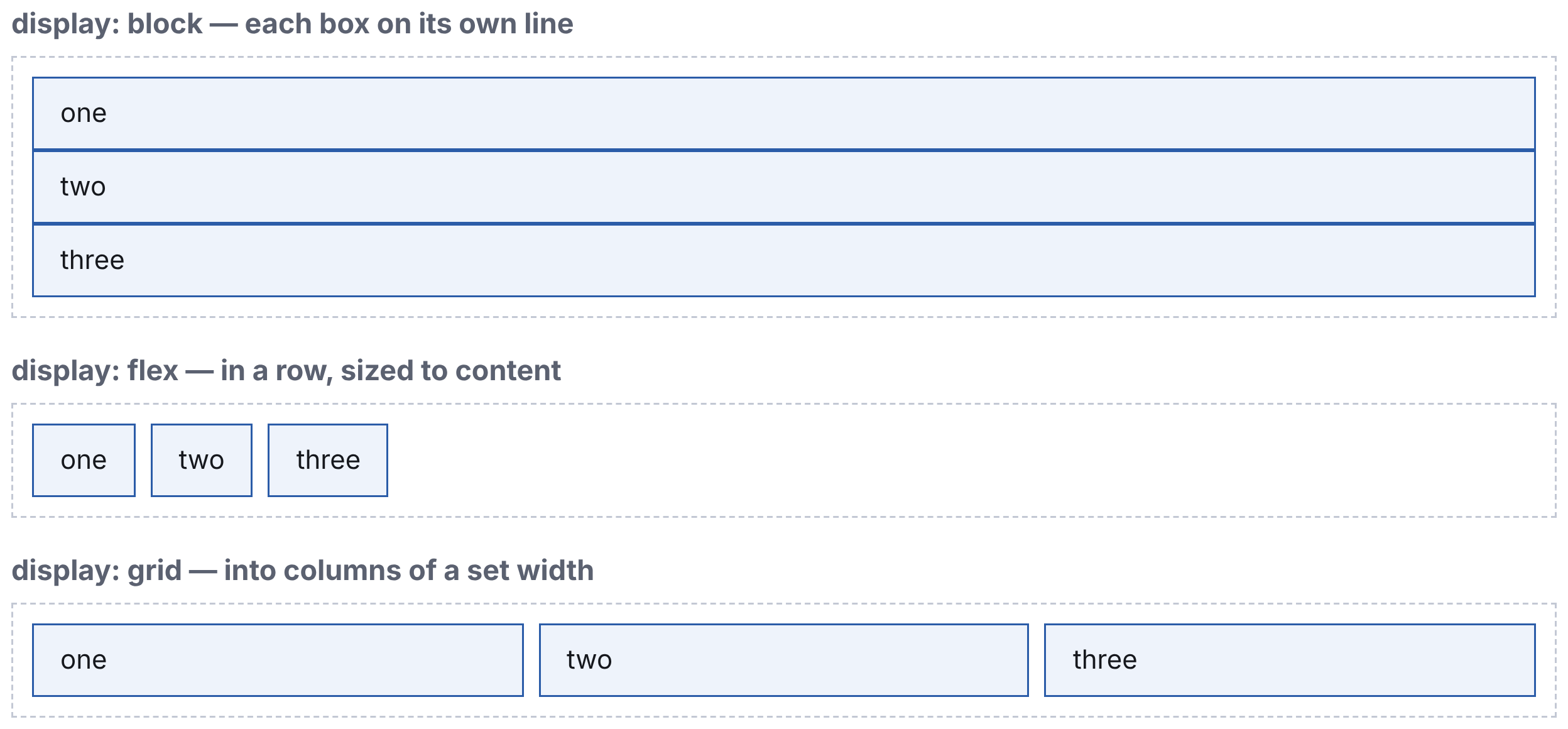
display values. A real screenshot — that is how the browser drew it.block— each element on its own line, across the full available width. That is howdiv,p,h1behave by default.flex— the children line up in a row, sized to their content. For rows of buttons, cards, panels.grid— the children are laid out on a defined grid of columns.
Ninety per cent of modern layout is flex and grid. If generated CSS
uses float or position: absolute to place boxes, that is the outdated
approach (article 3.1, reason 3).
The box: where the width comes from
The most common surprise in CSS. Two boxes, both with width: 200px,
padding: 20px, border: 4px:
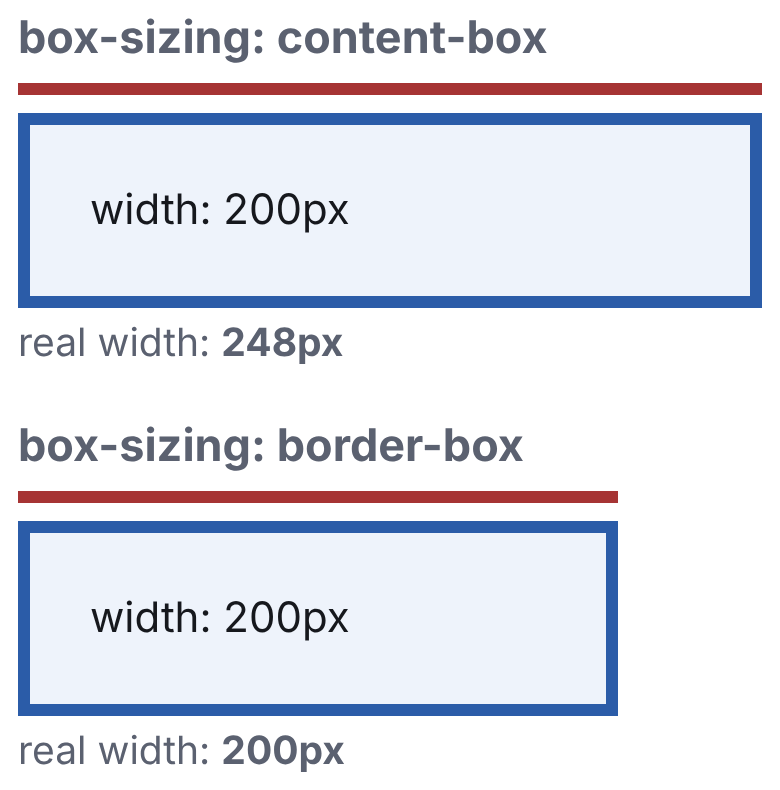
content-box the box is wider than specified by the padding and the border.Measured in the browser:
content-box: 248px
border-box:  200px
With box-sizing: content-box (the default) width sets the width of the
content, and padding and border are added on top: 200 + 20·2 + 4·2 =
248. With border-box, width sets the width of the whole box.
Which is why almost every project starts with:
* { box-sizing: border-box; }What to tell the AI
Why isn't this rule applying to .card__title?
Which selector overrides it? Don't change the code, explain.Lay these cards out in three columns with a 16-pixel gap, and
in one column on a narrow screen. Use grid, no float and no
position: absolute.There is an !important in this CSS. Work out which rule was
in the way and rewrite it without one.What to look for
!important. A sign of a conflict overridden rather than solved.
Magic numbers. margin-top: 37px, width: 433px — eyeballed for one
screen and falling apart on another.
position: absolute for layout. The element drops out of the flow, its
neighbours stop seeing it, and at another screen size everything slides.
A fixed height on a text block. height: 40px on an element with text:
with another font or a long word the text gets clipped.
Repeated values. The same gap written into ten places. Modern CSS has
variables for that: var(--gap).
Styles "just in case". float: left next to display: flex — one of
the two does nothing, and it isn't clear which.
Cheat sheet
The selector answers "to what", the properties "what to do".
A space in a selector means "inside":
.a .b≠.a.b.Weight: tag < class < id <
style<!important; at equal weight, the lower one.!importantin AI code is an overridden conflict, not a solution.Layout today is
flexandgrid;floatis obsolete.Box wider than you set? Check
box-sizing.