Components and JSX
markup inside the code
What it is
A component is a function that returns markup. That is the whole idea of React: instead of changing the page with commands, you describe how it should look given this data, and React brings it to that state itself.
JSX is the syntax that lets you write markup right inside the code. It looks like HTML, but it is JavaScript.
What it looks like in code
interface CityCardProps {
  name: string;
  temp: number | null;
  onRemove: (name: string) => void;
}

export function CityCard({ name, temp, onRemove }: CityCardProps) {
  return (
    <article className="card">
      <h2>{name}</h2>
      <p>{temp === null ? "no data" : `${temp > 0 ? "+" : ""}${temp}°`}</p>
      <button type="button" onClick={() => onRemove(name)}>Remove</button>
    </article>
  );
}
What comes out of that — real output:
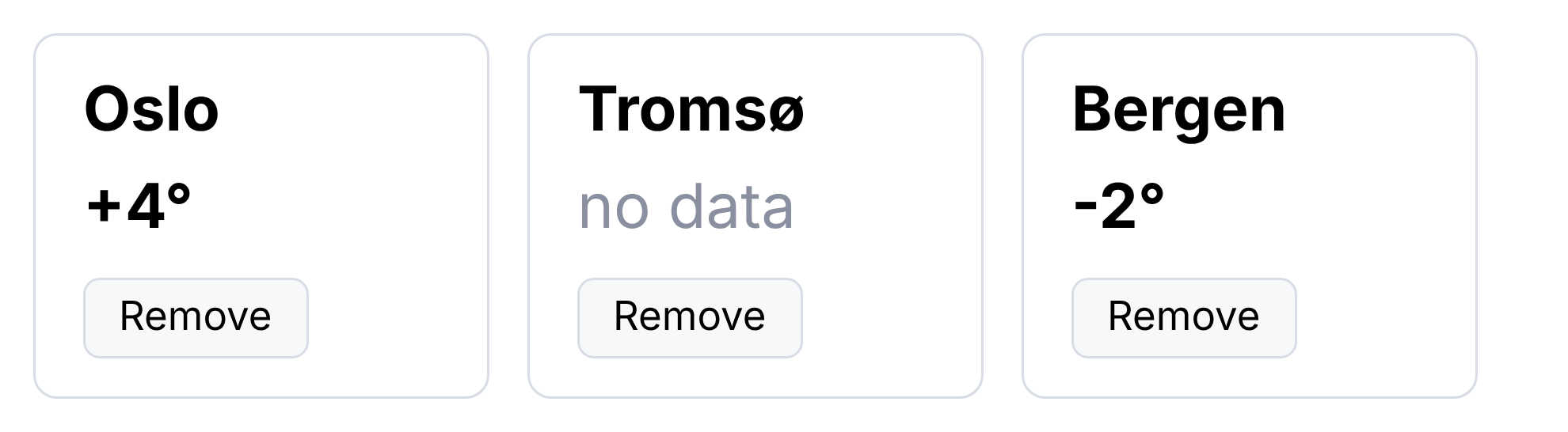
<article class="card"><h2>Oslo</h2><p>+4°</p>
  <button type="button">Remove</button></article>
<article class="card"><h2>Tromsø</h2><p>no data</p>
  <button type="button">Remove</button></article>
And how it looks on screen:
How to read it
A component is a function with a capital letter. That is not a style but a requirement: with a lowercase letter React takes it for an ordinary tag.
{ } inside the markup is an exit into JavaScript. Everything in curly
braces is evaluated: {name}, {temp === null ? ... : ...},
{() => onRemove(name)}.
className instead of class. class is a reserved word in
JavaScript. Likewise htmlFor instead of for.
One element is returned. Two roots side by side is an error. If you need
that, they are wrapped in an empty tag, <>...</>.
Destructuring in the argument. Writing the parameter as
({ name, temp, onRemove }: CityCardProps) means "take three fields out of
the props object". Equivalent to (props: CityCardProps) and then
props.name.
Lists and key
<div className="list">
  {cities.map(c => <CityCard key={c.name} {...c} onRemove={handleRemove} />)}
</div>
map instead of a loop. You can't write a for in JSX — instead an
array of data is turned into an array of elements.
key is mandatory. Not a formality: it is how React knows which element
is which when the list changes. Without a key, deleting from the middle of
a list makes the data "slide" onto the neighbours. React warns about this in
the console (article 8.4).
key must be stable. A record's identifier is good. An array index is
bad: it changes on sorting and deletion, and the point is lost.
{...c} is spreading. Pass every field of the object as props. Short,
but it hides what is actually being passed: the reader has to go and look at
what c consists of.
Conditions in the markup
{temp === null ? <p>no data</p> : <p>{temp}°</p>}   // if-else
{isLoading && <Spinner />}                           // only if
{items.length > 0 && <List items={items} />}         // careful!
The third line is a common trap. If items.length equals zero, a "0"
appears on the screen: zero isn't rendered as "nothing", it is printed as a
number. The safe forms are items.length > 0 && (as here) or the ternary
operator.
What to tell the AI
Make a CityCard component: it takes name (a string),
temp (a number or null) and onRemove (a function of the name).
If temp is null, show "no data".
Prop types as a separate interface, export it.This list is rendered with map and no key. Add a key based on
the record's identifier, not the index, and explain why.Split this component into three smaller ones. Don't change the
logic, only the structure. Show what props each one has.What to look for
No key, or key={index}. The most frequent mistake in generated
lists.
{items.length && ...}. It will show "0" instead of nothing.
A two-hundred-line component. It breaks into parts — otherwise it can be neither read nor reused.
Logic inside the markup. Three nested ternary operators in JSX read badly. Computations move higher up, into variables.
{...props} everywhere. Easy to write, hard to read: it isn't clear
what is being passed.
Markup without semantics. The same divs instead of button and
article (article 8.2) — React doesn't fix that.
Cheat sheet
A component is a capitalized function that returns markup.
{ }in JSX is an exit into JavaScript;classNameinstead ofclass.One root element is returned, otherwise wrap it in
<>…</>.Lists through
map;keyis mandatory and must be stable.key={index}breaks on sorting and deletion.{x.length && ...}will print "0". Writex.length > 0 &&.